 Skip to content
Action Apps
Actions allow apps to expose an autogenerated UI for simple backend actions. For use cases where an existing CLI application or API needs to be exposed as a web app, actions provide an easy solution. An app can have one or more actions defined. Each action has to be given a unique path, which does not conflict with any other route defined for the app. See weather app code:demo for an example of using Actions.
Sample Action
First, define the parameters to be exposed in the form UI. Create a params.star file with the params. For example,
param("repo", description="The GitHub repository to look up", default="openrundev/openrun")

param("show_issues", type=BOOLEAN, description="Whether to show the open issues count", default=True)
This app defines a run handler which calls the GitHub API for the specified repository, using the http plugin, and returns the stats as text.
load ("http.in", "http")

def run(dry_run, args):
   if "/" not in args.repo:
       return ace.result("Validation failed", param_errors={"repo": "expected owner/name format"})

   repo = http.get("https://api.github.com/repos/" + args.repo).value.json()
   out = ["Stars: %d" % repo["stargazers_count"], "Forks: %d" % repo["forks_count"]]
   if args.show_issues:
       out.append("Open Issues: %d" % repo["open_issues_count"])
   return ace.result("Repo info for " + args.repo, out)

app = ace.app("Repo Info",
   actions=[ace.action("Repo Info", "/", run, description="Show the GitHub stats for the specified repository")],
   permissions=[
     ace.permission("http.in", "get", ["regex:^https://api\\.github\\.com/.*"]),
   ],
)
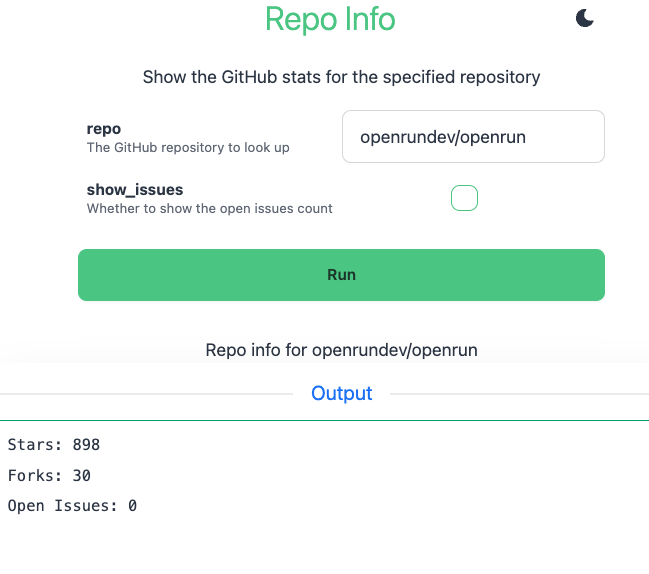
The app, when accessed, shows a form for the params, with the action output displayed below it:
Action Definition
An action is defined using the ace.action struct. The fields in this structure are:
| Property | Optional | Type | Default | Notes |
|---|---|---|---|---|
| name | false | string | The action name | |
| path | false | string | The path to use within app path | |
| run | false | function | The function to run on execution | |
| suggest | true | function | none | The function to run on suggest |
| description | true | string | none | The description for the action |
| hidden | true | list strings | none | The params which should be hidden in the UI for this Action |
| show_validate | true | boolean | False | Whether to show a Validate option for this action |
| permit | true | list string | [] | List of custom RBAC permissions, any one of which need to be granted for the user to allow this action |
| is_async | true | boolean | False | True runs the handler in the background, see Async Actions |
| timeout | true | string | none | Timeout of an async run, a Go duration like "2h"; defaults to the app’s action.run_timeout |
| read_only | true | boolean | none | True declares that the action changes nothing, see Side-effect Hints |
| destructive | true | boolean | none | True declares that the action makes changes which may not be reversible |
| idempotent | true | boolean | none | True declares that running the action again with the same args has no further effect |
| open_world | true | boolean | none | True declares that the action reaches outside the app (a web API, a mail sender) |
The name and description are shown in the app UI. The app params are displayed in a form. BOOLEAN types are checkboxes, others are text boxes.
When the form is submitted, the run function is called. The params are passed as an args argument. The response as returned by the handler is shown on the UI.
args argument to get the values from the form. Referencing param gives the app’s configured parameter values, not the values submitted in the form.The hidden property can be used to hide params for specific Actions. Set it to the list of params to hide, for example hidden=["param1"].
Action Result
The handler returns an ace.result struct. The fields in this structure are:
| Property | Optional | Type | Default | Notes |
|---|---|---|---|---|
| status | true | string | The action status message | |
| values | true | list | [] | The actions output, list of strings or list of dicts |
| report | true | string | ace.AUTO | The type of report to generate. Default is ace.AUTO, where it is selected based on response type. Other options are ace.JSON, ace.TEXT, ace.TABLE, ace.DOWNLOAD and ace.IMAGE. Any other value is a custom template name. |
| param_errors | true | dict | {} | The validation errors to report for each param. The key is the param name, the value is the error message |
Validating Params
The run handler can validate the parameters. If there are errors, it can return a validation error like
def run(dry_run, args):
  if args.dir == "." or args.dir.startswith("./") or args.dir == ".." or args.dir.startswith("../"):
     return ace.result("Validation failed", param_errors={"dir": "relative paths not supported"})
  if dry_run:
     return ace.result("Validation successful")

  # Actual code for run handler
Errors can be reported for multiple params. If the action definition has show_validate=True, then a Validate option will show up in the UI. Calling that will invoke the run handler with dry_run=True. The run handler should return after the param validation when dry_run is true.
Suggest Handler
If a suggest handler is defined for an action, then a Suggest button shows up in the UI. Suggest allows property values to be populated dynamically. For example, if the app has three params A, B and C, and all are empty initially. The first suggest can do return {"A": ["avalue1", "avalue2", "avalue3"]}. This will populate the A param with a dropdown. A subsequent suggest call can populate the value for B, with a list of options or with an actual value. The suggest handler is optional. A sample suggest handler is
def suggest(args):
    if not args.A:
        alist = []
        res = store.select(table.adata, {})
        for aval in res.value:
            alist.append(aval.name)
        return {"A": alist}
    else:
        if not args.B:
            res = store.select_one(table.adata, {"A": args.A})
            return {"B": res.value.bval}
    return {}
See weather app code:demo for an example of using suggest.
Report Types
The response values can be a list of string or a list of dicts. The report is generated automatically by default. For list of strings, the report is a TEXT report. For list of dicts, the report can be either
- TABLE - selected if all dict values for the first row are simple types
- JSON - selected if any of the values for the first row is a complex type (like dict or list)
For TABLE report, the fields from the first row are used as columns. Extra fields in subsequent rows are ignored. For JSON report, a JSON tree representation of each row is shown. The report type can be set to specific type instead of using AUTO.
Streaming Output
A run handler that starts a long running command can stream the command’s output to the page as it is produced, instead of returning it after the command exits. Call exec.run (or container.run) with stream=True, check the call for a startup error, and return the response object in the stream property of ace.result:
load("exec.in", "exec")

def build_run(dry_run, args):
    if not args.target:
        return ace.result("Validation failed", param_errors={"target": "target is required"})
    if dry_run:
        return ace.result("Ready to build " + args.target)

    ret = exec.run("make", [args.target], cwd="/srv/app", stream=True)
    if ret.error:
        return ace.result("Could not start make: " + ret.error)
    return ace.result("Building " + args.target, stream=ret)

app = ace.app("builder",
    actions=[ace.action("Build", "/", build_run, show_validate=True)],
    permissions=[ace.permission("exec.in", "run", ["make"])])
The status text shows immediately and a log pane below it fills as the command prints; terminal colors and progress bar updates render as in a terminal. When the command exits, the pane reports the exit status, and a non-zero exit marks the status line as an error. Closing the page stops the command. Returning the stream response object directly from the handler is shorthand for ace.result("", stream=ret).
A streamed result has no values or report (the output is the report) and cannot carry param_errors: do the validation, and return, before starting the command. A stream returned when dry_run is true (the Validate button) is an error. Nothing is declared on ace.action: the handler decides per run, so a validation failure still returns an ordinary result.
The audit event for the action records success only when the command exits with status 0.
See the actiontail app code for a runnable sample: a shell loop whose output is tailed live, cancelled when the page is left.
Async Actions
A sync action runs its handler inside the request: the browser waits, the server’s request timeout applies (three minutes), and closing the page cancels a streamed command. An action which takes longer, or whose runs should be kept, is declared with is_async=True:
load("exec.in", "exec")

def rebuild(dry_run, args):
    if not args.target:
        return ace.result("target is required", param_errors={"target": "required"})
    if dry_run:
        return ace.result("Ready to rebuild " + args.target)
    return exec.run("make", ["-C", "/srv/site", args.target], stream=True)

app = ace.app("site",
    actions=[ace.action("Rebuild", "/rebuild", rebuild, is_async=True, timeout="2h",
                        show_validate=True, description="Rebuilds the site (takes 10-30 minutes)")],
    permissions=[ace.permission("exec.in", "run", ["make"])])
The form of an async action has a Start button: it starts a run (the handler executes in the background on the server, as the submitting user) and opens the run page. The run page shows the status, the args, the output of a streamed command as it is produced (the page can be closed and reopened), and, once the run ends, the result rendered as a sync action renders it. The Run History link under the action title lists the runs of the action, newest first: their status (running, succeeded, failed, timed_out, canceled or lost), the user who started them, their duration and one column per arg, filterable by status and by text (name=value for an exact arg, a bare word for text in any arg value, the result status or the failure message). A running run can be canceled from its page, and Run again opens the form with the run’s args.
The handler is written as for a sync action: it returns a stream (the run’s output is the command’s output, exit code 0 is success) or an ace.result with values and a report (stored with the run). print() calls in the handler go to the run output. A result with param_errors fails the run; validate the args with show_validate=True or the dry_run branch, which remain synchronous. Password params are not recorded with the run, and file upload params are recorded by file name.
The runs are recorded in the metadata database, per app instance (the stage instance has its own runs): the last action.retain_runs runs (default 100, across the app’s actions) are kept. For a streamed command the first and last action.output_head_bytes and action.output_tail_bytes (10MB each) of the output are kept and the bytes in between are dropped, with a marker; for a values result up to action.result_max_bytes (100MB) of JSON, whole rows beyond that are dropped and the run says so. The run page renders the first action.display_rows (1000) rows and offers the stored result as a download. action.run_timeout (default 1h) is the timeout of runs without their own timeout, and action.max_async_runs (20) caps the runs of an app instance executing at once on a node. All are [app_config] settings in the server config, overridable per app with openrun app update conf --promote 'action.retain_runs=20' /site.
A run executes on the node which accepted it; if the node stops, the run is marked lost after a minute and can be started again. A reload or update of the app while a run executes lets the run finish on the version it started with. Every run writes an action audit event with the operation run_finish, the run id and its status, in addition to the submission’s event.
Through the REST API the run endpoint of an async action answers 202 with the run_id and the run url; GET /api/runs/<id> (with ?wait=30s to wait for the end, up to action.max_wait_secs) returns the run with its result, GET /api/runs/<id>/output?since=<offset> the output, GET /api/runs?action=<path>&status= lists the runs and POST /api/runs/<id>/cancel cancels one. The CLI and the MCP tools have the same operations.
Side-effect Hints
An action can declare what its run does to the world, with the read_only, destructive, idempotent and open_world fields of ace.action:
app = ace.app("orders",
    actions=[
        ace.action("Order Report", "/report", report, read_only=True),
        ace.action("Cancel Order", "/cancel", cancel, destructive=True, description="Cancels the order and refunds it"),
        ace.action("Set Flag", "/flag", set_flag, destructive=False, idempotent=True),
    ])
The hints are informational: they never change who may run an action (permit and RBAC do) or how it runs. They are shown as a Hints column by openrun action list and a Hints: line by openrun action show, returned as hints by the list_actions and get_action management APIs, and become the tool annotations of the action’s MCP tool (readOnlyHint, destructiveHint, idempotentHint, openWorldHint), which AI clients use to decide when to ask the user before a call. read_only=True implies not destructive and idempotent. An action which declares none of the fields has no hints and no tool annotations, and clients treat it as they did before hints existed.
destructive=True has two visible effects: the action page shows a Destructive badge next to the action name, and MCP clients which support elicitation are asked to confirm the call before the action runs (see MCP Tools). The CLI and the REST API run a destructive action at once, as they run any other action.
Custom Templates
If the report type is set to any value other than ace.AUTO, ace.TEXT, ace.JSON, ace.TABLE, ace.DOWNLOAD or ace.IMAGE, that is treated as a custom template to use. The template should be defined in a *.go.html file. Either the file name can be used or a template/block name can be used. See template for details.
For styling, OpenRun uses DaisyUI by default, so default styles are reset. The custom template can use inline styles or it can use TailwindCSS/DaisyUI. For DaisyUI, the app has to be run in dev mode first for the style.css to be generated. See styling for details.
See dictionary code:demo for an actions example app which shows different type of reports.
Param Value Selector
For some params, it is useful to be able to provide a list of values from which the user can choose. The way this is supported is by using an options param. options_ is a special param name prefix: if param1 is a param which should show up as a selector, then define another param with the name options_param1, of type LIST. Set a default value for options_param1 with the values to show in the selector dropdown. For example
param("param1", description="The param1 description", default="option1")

param("options_param1", type=LIST, description="Options for param1", default=["option1", "option2"])
In the UI, options_param1 is not displayed. param1 is shown as a searchable dropdown, having option1 and option2 as options. Typing in the field filters the options. By default the dropdown is strict: the value has to be one of the options (enforced in the UI and also on the server for configured option lists). To allow free text entry in addition to the listed options, set display_type=COMBO on the param:
param("param1", description="The param1 description", default="option1", display_type=COMBO)

param("options_param1", type=LIST, description="Options for param1", default=["option1", "option2"])
The options-param1 naming format (with a dash) is also supported, for backward compatibility. The underscore format is preferred since it is a valid Starlark identifier, so the value stays accessible in the app code as param.options_param1.
The same applies to dropdowns populated by a suggest handler: values suggested as a list show as a strict searchable dropdown unless the param has display_type=COMBO. See dictionary for an app which uses options.
This approach is used for flexibility, instead of directly allowing the options to be configured for the param. The options param approach has the flexibility that when an app is installed, the options can be configured for the installation. This avoids having to maintain different copies of the app code. For example:
openrun app create --approve --param options_param1='["option1", "option2", "options3"]' /mycode /myappadds a new options3 option.
Display Types
For string type params, the display_type property can be set to FILE, PASSWORD, TEXTAREA or COMBO. If no value is set, the field shows as a text input box. FILE param shows as a file upload input. PASSWORD shows as a password input. TEXTAREA shows as a text area. COMBO makes a dropdown param (one with a value selector or suggest provided options) accept free text entry in addition to the listed options; without it dropdown values are restricted to the list.
File Handling
For FILE display type, the Action app user can upload a file. The file is uploaded to a temp file on the server and the file name is available through the args.param_name. The file can be processed as required from disk. Multiple FILE type params are supported, each param can upload one file only. The temp files are deleted at the end of the handler function execution.
Action request bodies are capped by default at 33554432 bytes. To change this globally, update app_config.action.max_request_body_bytes in openrun.toml. To override it for one app, run:
openrun app update conf --promote 'action.max_request_body_bytes=67108864' /myappTo return a file as output for the action, use the fs.serve_tmp_file API. This makes a file on disk available through an API.
See number_lines app code:demo for an example of using this API. Use report=ace.DOWNLOAD property in the ace.result to generate a file download link.
Files from the system temp directory and from /tmp are accessible by default for serve_tmp_file API. The file is deleted from disk by default after the first download. This can be configured at the system level using
[app_config]
fs.file_access = ["$TEMPDIR", "/tmp"]
To set this at the app level, run
openrun app update conf --promote fs.file_access='["/var/tmp", "$TEMPDIR", "/tmp"]' /myappREST API
Every action app automatically exposes a REST API in addition to the form UI, with no change required in the app code. The API is mounted at the reserved /api path under the app path (an action cannot be defined at the /api path). Authentication and authorization work the same as for the UI: the app level auth applies, and per-action permit RBAC checks are enforced.
| Endpoint | Method | Notes |
|---|---|---|
/app_path/api | GET | List the actions available in the app, with their API paths |
/app_path/api/openapi.json | GET | OpenAPI 3.0 spec for the actions the current user has access to |
/app_path/api/actions/<action> | GET | Get the param definitions (name, type, default, options) |
/app_path/api/actions/<action> | POST | Run the action |
/app_path/api/suggest/<action> | POST | Run the suggest handler |
/app_path/api/validate/<action> | POST | Run the handler with dry_run=True |
The operationId values in the OpenAPI spec are run_<name>, validate_<name>, suggest_<name> and schema_<name>, where <name> is the action name used by the command line and the MCP tools: the action path with / replaced by _, and for the action at / its name in lowercase (run_cancel_order for the Cancel Order action).
<action> is the action path. For an action at path /, the run endpoint is /app_path/api/actions and the validate endpoint is /app_path/api/validate. For an action at path /list, they are /app_path/api/actions/list and /app_path/api/validate/list. The action list endpoint reports the run, validate and suggest paths for each action.
The run/suggest/validate endpoints accept a JSON body with the param values, using native JSON types ({"dir": "/tmp", "detail": true}). String values are coerced to the param type, same as form submissions, and values for params with a selector must be one of the configured options unless the param uses the COMBO display type. Params missing from the body use their app level values, including BOOLEAN params (unlike the form UI, where a missing checkbox means false). Hidden params and unknown params are rejected with a 400 error. Form encoded and multipart bodies are also accepted; params with FILE display type must be submitted as multipart file uploads and cannot be set through JSON.
The response is a JSON object with status, values and report (the resolved report type, such as TEXT, TABLE or JSON). Param validation errors are returned with a 422 status and a param_errors object. Handler failures return a 500 status with an error message.
$ curl -X POST -H "Content-Type: application/json" -d '{"dir": "/var/log"}' https://example.com/myapp/api/actions
{"report":"TEXT","status":"File listing for /var/log","values":["total 0\n..."]}
An action which streams its output responds with chunked text/plain instead: the command output as it is produced (curl -N shows it live), the result status text in the OpenRun-Action-Status response header and the command’s exit status in the OpenRun-Exit-Status HTTP trailer, sent when the stream ends. A missing trailer means the stream was cut before the command exited. Param validation errors and handler failures keep the JSON shapes above.
$ curl -sN -X POST -H "Content-Type: application/json" -d '{"target": "web"}' https://example.com/builder/api/actionsCommand Line
Actions can be listed and run with the openrun action commands, from the server machine or through a remote CLI. No change is required in the app code.
openrun action list [<appPathGlob>]                       # the actions you can run
openrun action show <appPath> [<action>]                  # the params, and a usage line to copy
openrun action run <appPath> [<action>] [name=value ...]  # run the action
openrun action validate <appPath> [<action>] [name=value ...]  # run the handler with dry_run=True
openrun action suggest <appPath> [<action>] [name=value ...]   # run the suggest handler
openrun action openapi <appPath>                          # the OpenAPI spec of the REST API
<action> is the name shown in the Action column of action list: the action path with / replaced by _ (/orders/cancel is orders_cancel), or for the action at /, its name in lowercase (Cancel Order is cancel_order). The action path (like /cancel) is accepted too. <action> can be left out for an app with one action. --stage uses the staging instance of the app.
$ openrun action run /orders list_orders count=2 status=closed
Listed 2 orders
id  rush   status
1   false  closed
2   false  closed
Args are passed as name=value, the value is converted to the type of the param as a form value would be (true/false for BOOLEAN, a JSON value for LIST and DICT). Params which are not passed use the value configured for the app. --json '{"count": 2}' passes typed args as a JSON object (--json=@file reads the object from a file, --json=- from stdin); name=value args override its entries. name=@file uploads the file for a param with the FILE display type.
The result values are written to stdout and the status line to stderr (--quiet turns it off), so the output can be piped. The values are shown the way the action reports them: a table for TABLE, lines for TEXT, formatted JSON for JSON. --format json, jsonl or csv converts them:
openrun action run -q --format jsonl /orders list_orders status=open | jq .idFor an action which returns files (the DOWNLOAD and IMAGE report types), the files are listed with their url; --output saves them:
openrun action run -o report.pdf /orders report month=2026-08   # one file, saved under the given name
openrun action run -o ./out/ /orders charts                     # into a directory, under the names the action gave the files
openrun action run -q -o - /orders export | head                # to stdout
A directory is required when the result has more than one file. The CLI has no browser session with the app, so a file whose url is within the app (a file from fs.serve_tmp_file, a static file of the app) is fetched through the OpenRun API as the calling user, under the same checks as running the action; the rules of the file apply, a single_access file is removed once it has been saved. Any other url is fetched directly, without credentials.
The output of an action which streams a command is written as it is produced. action suggest prints the suggested values as name=value lines, the form action run takes them in.
| Exit code | Meaning |
|---|---|
| 0 | The action ran |
| 2 | Param validation errors, printed as error: param <name>: <message> |
| 1 | Any other failure: invalid args, not authorized, a handler error |
| other | For a streamed command, the exit code of the command |
Async actions
openrun action run of an async action starts the run and prints its id; --wait polls the run until it ends and prints the result as for a sync action (with the same exit codes), --follow prints the output of a streamed command as it is produced and then the result. The runs are managed with:
openrun action runs /site [rebuild] [--status failed] [--limit 20]   # the runs of the app (or one action), newest first
openrun action output <run-id> [--follow]                            # the stored output (the first and last 10MB), or the result values as JSON
openrun action cancel <run-id>                                       # stop a running run
Ctrl-C while following leaves the run running. openrun action show reports async actions, and openrun action list -f json carries async.
Who the action runs as
The CLI runs actions through the management API as the calling user, under the same checks the form UI applies to that user:
- The user comes from the login the app’s
authsetting names. A user logged in asbuiltin:bobcannot run the actions of an app with--auth saml_okta, even if an RBAC group grant covers both identities. Apps withauthnoneaccept any user; apps usingsystemor client certificate auth can be used by the admin only. - The user has the
app:accesspermission on the app. - The user has one of the permissions in the action’s
permitlist.
Listing actions does not load or start apps: the actions of an app version are stored with its metadata when the app is created, reloaded or promoted. Apps in dev mode are listed from their current source. action show loads the app definition, and only running an action (or its suggest handler) starts the app’s container.
action list shows only the actions which pass all three checks, and runs are recorded in the audit log under that user, with the operation mgmt_execute, mgmt_validate or mgmt_suggest.
On the server machine the CLI uses the unix domain socket and runs as the admin user; --as builtin:user1 runs the command as that user instead. A remote CLI runs as the user who did openrun login, or as the user an API key belongs to. For the users of an app to log in from the CLI, add the app’s auth provider to the login mechanisms of the REST API surface:
[api.rest]
enable = true
auth = ["admin", "saml_okta"]  # users of apps with --auth saml_okta can run openrun login
openrun login --server https://openrun.example.com --auth saml_okta # browser login through the SAML provider
openrun action list # the actions of the apps saml_okta users can access--auth selects the login when the server has more than one; without it the login page offers the choice. The CLI keeps one login per server. An API key limited with --scopes needs app:access in its scopes to run actions.
MCP Tools
An app with actions serves them as MCP tools, for AI clients like Claude Code, Cursor and VS Code. No option and no change in the app code is required. The MCP endpoint is at /mcp under the app path; the form UI and the REST API stay as they are.
openrun app create --approve --auth builtin ./orders /orders
claude mcp add --transport http orders https://apps.example.com/orders/mcp
The endpoint is on by default:
--mcp=disable(oropenrun app update mcp disable /orders) turns all MCP off for the app: no endpoint, the app is left out of the endpoint for all apps, and the management action tools refuse it when called over MCP. The CLI, the REST API and the form UI are not affected.openrun app update mcp default /ordersgoes back to the default.--mcp=actionsis the same endpoint as an explicit setting; the JSON form changes the path or adds scopes (below). With an explicit setting an action cannot be defined at the endpoint path, and the app create fails when the server has no usable OAuth issuer origin.- Without a setting the endpoint never gets in the way: when the app has a route or an action at
/mcp, that route is served and the actions are not exposed there (set anotherpathto serve them). A container or proxy app, whose routes OpenRun cannot see, gives up its upstream path/mcpto the endpoint; use--mcp=disableor anotherpathwhen the upstream needs it. - The endpoint is served over HTTPS (and over plain HTTP on localhost, for development) on a server with an OAuth issuer origin, as for any MCP app.
The client connects with the OAuth flow described in MCP Apps: the user logs in with the app’s auth, the token is bound to the app, RBAC app:access applies, and the app’s scopes and per tool scope requirements (tools) can be declared with the JSON form, --mcp='{"source":"actions","scopes":[...],"tools":{"cancel_order":"orders:write"}}'. "path" moves the endpoint from the default /mcp. API keys bound to the app (openrun apikey create --resource app:/orders) work for clients which cannot run a browser flow.
Each action is one tool:
- The tool name is the action name used by the CLI (
cancel_order), the title is the action name and the description is the action description. - The input schema has the action’s params: the type, description, the app level value as the
default, the selector options as anenum(as thex-optionssuggestions for theCOMBOdisplay type, which accepts other values) and therequiredlist. Hidden params are left out. dry_run=trueruns the handler withdry_run=True, to validate the arguments without running the action. When the action has a param calleddry_runthe control is named_dry_run(with as many leading underscores as it takes to not be a param of the action); the tool description names it.- An action with a suggest handler gets a second, read only tool named
<tool>_suggest(with a numeric suffix if another action already has that name; the description of the action’s tool names it). - A tool call cannot carry a file: params with the
FILEdisplay type are left out, and an action with a requiredFILEparam is not exposed as a tool. - The side-effect hints of the action are its tool annotations; an action without hints has no annotations. The suggest tool and the run tools of async actions are marked read only.
An action declared destructive=True is confirmed by the user before it runs, when the client supports it (MCP protocol 2026-07-28 or later with the elicitation capability, which the current versions of the major clients have): the first call validates the arguments (as dry_run=true would; param errors are returned for correction instead) and answers with a confirmation prompt naming the action, the app, the arguments (password params hidden) and the status the validate pass reported; the client retries the call with the user’s answer, and the action runs only on an accepted answer. A declined call returns status declined by the user, no changes were made (not an error) and is recorded in the audit log as a failed mcp_execute with confirm=declined. A call with dry_run=true needs no confirmation. Clients without elicitation support run the action at once, as before. [api.mcp] skip_destructive_confirm = true turns the confirmation off for the whole server, for headless automation; it applies to the destructive management tools too.
The tools a user sees in the client are the actions their permit allows. The tool list is marked private to the caller’s client (cacheScope) with a freshness hint (ttlMs) of action.mcp_list_ttl, an [app_config] setting (default 3m, overridable per app with openrun app update conf 'action.mcp_list_ttl="30s"' /orders): how long a client may use the listed tools before listing again. The server does not push tool list changes; after a reload, promote or update which changes the actions, a client sees the new tools at its next listing, while every call is evaluated against the current actions regardless of the list the client holds (a removed tool fails, an added tool works). A dev app whose actions change often can set a short ttl. The result of a tool call has the structured result (status, report, values, param_errors) and a text block written for the model: the status line followed by a markdown table (the first 50 rows), the text lines, or JSON. The text block is limited to 64KB of values, with a note of how many values were left out, and the structured values to 256KB (truncated is set); an action meant for AI clients should return a focused result rather than rely on the limits. Param errors are returned as a tool error listing param <name>: <message>, so that the model can correct the arguments and retry. The files of IMAGE and DOWNLOAD results are returned inline, since an MCP client has no session with the app to fetch their url with: images as image content (up to 2MB each), other files as embedded resources (as text for text files up to 256KB, as binary data up to 1MB). Up to four files are inlined per result; larger or additional files, and urls outside the app, are returned as resource links. A single_access file is removed once it has been returned.
For an action which streams a command, the call returns when the command exits, with the output (the last 64KB) and the exit_status; a non-zero exit is a tool error. Clients which pass a progress token receive the output as progress notifications while the command runs. Tool calls are recorded in the audit log under the user, with the operation mcp_execute, mcp_validate or mcp_suggest.
The tool of an async action returns the run_id and run_status of the started run; its optional wait_seconds argument (up to 60) waits for the run and returns the result as a sync tool would. An app with async actions has three more tools: get_run (run_id, wait_seconds) returns a run with its result or the tail of its output, list_runs lists the runs and cancel_run stops one.
One endpoint for all apps
/_openrun/app_mcp is a single MCP endpoint whose tools are the actions of every app the user can run, each action its own tool. It is on by default; [api.app_mcp] enable = false turns it off. It is not served on a server which runs with security.unsafe_disable_rbac.
claude mcp add --transport http apps https://openrun.example.com/_openrun/app_mcp
claude mcp add --transport http team "https://openrun.example.com/_openrun/app_mcp?apps=/team/**"
claude mcp add --transport http sso "https://openrun.example.com/_openrun/app_mcp?auth=google_openrun"| URL param | Default | Meaning |
|---|---|---|
apps | all | App path glob selecting the apps of the view (/team/**, example.com:/**). A filter for the client’s convenience, not an access boundary |
auth | security.app_default_auth_type | The login: none, system, builtin, an [auth.*] entry name or saml_<name> |
stage | false | true lists and runs the staging version of each app |
- Who can run what is decided per app exactly as for
run_action: RBACapp:access, the app’s login (below) and the action’spermit. Apps and actions the user cannot use are not listed, and calling one answers as an unknown tool does. - One login per URL. An action runs only for a user who logged in the way the app’s users do. An
auth=builtinentry therefore lists the apps which use builtin auth, plus the apps with authnone(which accept any login). A user with apps on two logins adds two entries. The login is part of the token: a token for oneauthvalue is not accepted at another, nor at the management endpoint or an app’s own endpoint. auth=noneneeds no login. Requests run as theanonymoususer and list the apps with authnoneonly. That is what a bare URL does on a server whoseapp_default_auth_typeisnone(the default): add?auth=<login>to see your own apps too.- Tool names are
<app>__<action>. The app part is the app path with/as_(/team/ordersgivesteam_orders__cancel_order,/my-appgivesmy-app__ping). An app whose path has other characters (_,.), an app on another domain and the root app carry a short hash of their path instead of clashing with another app (team_orders--3fa2c41b__cancel). A name depends on its app alone, it does not change when other apps are added. The app part is at most 24 characters and the action part 38, longer ones are cut and carry a hash. - Left out: apps with
--mcp=disable, and apps whose mcp setting has atoolsscope map (their tools need scopes only the app’s own endpoint can grant). - The tools behave as on the app’s own endpoint:
dry_run, the suggest tools, the confirmation of destructive actions, results with files, and the run tools of async actions (<app>__get_runand so on). - The list fails when it has more tools than
[api.app_mcp] max_tools(default 300), asking for a narrowerappsglob, rather than hide tools silently. - API keys:
openrun apikey create --resource app_mcp:builtin --scopes app:access(app_mcpalone is the default login). Browser based clients are not supported, a request with anOriginheader is refused.
Actions of all apps are also available through the generic list_actions, get_action, run_action and suggest_action tools of the management MCP surface, unless the app has --mcp=disable; list_action_runs, get_action_run and cancel_action_run manage the runs of async actions there, and run_action takes wait_seconds for them.
Multiple Actions
Multiple actions can be defined for an app. Each action should have a dedicated path. If there are multiple actions, a switcher dropdown is automatically added for the app. The order of entries in the dropdown is the same order as defined in the app.
See weather app code:demo for an example of using multiple actions in one app.
Actions for Spec Apps
An app built from a spec (for example --spec python-flask) has no app.star of its own: the spec’s app.star proxies every request to the container. Such an app adds actions with two optional files next to its code, without copying the spec’s app.star:
actions.stardefines the actions. It must setactionsto a list oface.actionentries, and may setpermissionsto a list oface.permissionentries for the plugins the actions use. Both lists are appended to the app definition, after any entries inapp.star. The file can load plugins and other.starfiles, and has theparammodule with the app’s param values.action_params.stardeclares the params the actions present, with the sameparam(...)syntax asparams.star. When this file exists, every action of the app shows exactly these params (minus the action’shiddenlist) in the UI, the REST API, the CLI and the MCP tool schema, andargshas exactly these params. Theparams.starparams (for a spec app, the spec’s own params likeport) are not shown. Without this file, everyparams.starparam is an action param, as before.
The params of action_params.star are app params in every other way: --param name=value at create and openrun param update set the value the action presents as the default, they are members of the param module and they are passed to the container environment like every param. A name declared in both files is an error. A required action param without a default does not need a value at create time: it is supplied when the action runs, and a run or validate call without it is refused with a param error before the handler is called.
load("http.in", "http")

def list_orders(dry_run, args):
    if dry_run:
        return ace.result("Arguments are valid")
    resp = http.get(ace.CONTAINER_URL + "/internal/orders", params={"status": args.status})
    return ace.result("Orders", resp.value.json(), ace.TABLE)

actions = [ace.action("List Orders", "/orders", list_orders, description="Open orders from the app")]
permissions = [ace.permission("http.in", "get")]param("status", description="Order status", default="open")
param("options_status", type=LIST, default=["open", "closed", "all"])openrun app create --approve --spec python-flask --mcp=actions ./orders-app /orders
openrun action run /orders orders status=closedThe action’s handler reaches the container’s own APIs through the http plugin with ace.CONTAINER_URL. The action paths, the /api path of the actions REST API and the /mcp region of --mcp=actions are served by OpenRun; every other path is still proxied to the container. Actions on such an app need a sub path, an action at / cannot share the app root with the proxy.